

In This Article
Your virtual event is live. Chat’s dead. Someone just left, then two more. That is exactly why AI Avatar Tools Dominate Virtual Event Hosting exists.
And once you see why, it is hard to ignore. Only 23% of people think virtual conferences offer anything a recording can not. Less than a quarter. And 35–40% bail before it is even over, not because they are rude, just because nothing pulled them back in. These tools are not magic. They fix the specific things that kill virtual events, dead air, shaky delivery, and sessions nobody remembers 10 minutes later.
Some handle multiple languages. Some scale in ways no human host can. This guide covers 9 proven ones. What they actually do, not the landing page version.
These tools are not magic. They fix the specific things that kill virtual events, the same way AI chatbots handle real-time audience interaction. It has changed how brands stay connected during live sessions.
What Exactly Is an AI Avatar Tool and How Does It Work?
An AI avatar tool is software that creates a digital human presenter, one that speaks, moves, and hosts your virtual event without you ever touching a camera. These tools run on synthesized speech and human-like expressions. Your audience sees a confident host. You see one less thing to stress about.
Three things worth knowing before you pick one: Write your script in short, conversational sentences. Simpler language makes the voice sound more natural, not less. Match the avatar type to your event. Real-time avatars handle live Q&A well. Pre-recorded ones suit structured, polished sessions. Wrong choice quietly kills engagement.
Always do a test run. One lip-sync glitch in a live setting hits harder than you would expect. Think of it less as a robot and more as a co-host that never forgets its lines.
Here are 9 Proven AI Avatar Tools That Actually Deliver Results
1.HeyGen: The Live Event King That Puts You in the Room
Ever had a host cancel at the last minute? Or watch someone lose their energy halfway through a session, nobody could leave? HeyGen is worth knowing about if you run virtual events regularly.
It is LiveAvatar streams a real-time AI presenter using WebRTC, low latency, smooth video, and believable enough that audiences do not clock the difference. The latest update lets your avatar join Zoom calls, run multiple meetings at once, and keep going while you handle everything else behind the scenes. It supports 175+ languages with solid lip-sync. One script, multiple languages, no re-recording.
Three things to actually use: Start on the free plan. Upload a photo, paste your script, and no credit card. There is no reason to pay before you have seen what it does. Pair it with a human moderator for live events. Q&A participation and watch time both group when you combine the two; the avatar handles delivery, the human handles the room.
Do not use it as a replacement. Use it as a co-host that never forgets its lines or has an off day.
2. Synthesia: The Enterprise Powerhouse That Never Misses
Studio booking, an actor, a full production crew, and the final video still felt like something you would skip after 10 seconds. Synthesia cuts all of that out. Over 60,000 companies use it, including 90% of the Fortune 100. Zoom, Reuters, Heineken. That is not a marketing claim; it is just a useful signal about where the tool actually holds up.
Version 3.0 added Video Agents, avatars that hold real-time conversations with viewers instead of just presenting to them. One-way video becomes something closer to a dialogue. Three things worth doing before you go live: Keep your script under 150 words. Short, plain sentences make the avatar sound natural. Longer scripts do not; they just expose the seams. Use the 1-click translation on everything. Traditional production runs $1,000–$5,000 per finished minute. Synthesia does not. That gap funds a lot of other decisions.
Test two avatars with the same script before committing. Thirty minutes of A/B testing tells you more about brand fit than any spec sheet. It is not magic. It is just a significantly cheaper, faster way to produce video that does not look cheap.
And if you want to understand the technology behind it, how AI image generation works behind the scenes explains exactly what is happening under the hood.
3. Akool: The Real-Time Avatar That Feels Dangerously Human
A robotic host with frozen expressions is somehow worse than no host at all. The audience does not just leave, they leave quietly, one by one, and you do not notice until the room is half empty. Akool’s Streaming Avatar is built around avoiding exactly that. It reads audience input and responds with facial expressions, gestures, and voice that actually track with what is happening, not a loop, a reaction.
It scales to thousands of simultaneous sessions without the quality dropping, so the person in seat 4,000 gets the same experience as seat one. Three things worth using: Connect it to your knowledge base via LLM integration. Akool can pull live data, handle technical questions, and translate in real time. Your avatar stops being a presenter and starts being genuinely useful.
Watch your credits before going live. The pricing is credit-based, and high-volume sessions add up fast. Run the full event flow on the free 100-credit plan first, burn paid credits only on the real thing. Use the 24/7 mode before and after your event. It welcomes early arrivals, handles FAQs, and keeps the room warm before you officially start. Most hosts skip this. They should not.
It is not the most famous tool on this list. But for live, responsive, human-feeling interaction, it is hard to beat.
4. Colossyan: The Training Champion That Keeps Learners Hooked
Employees clicking through slides, scoring zero on the quiz, and forgetting everything by lunch. If you have run corporate training, you’ve seen this. It is demoralizing and expensive. Colossyan is built specifically for training, not general video production. Branching scenarios, in-video quizzes, 300+ avatars, SCORM export.
Paramount and Sonesta use it. Clients typically see learner pass rates climb 10–20% and build time drop by up to 80%. Three things worth actually using: Use branching scenarios for compliance and onboarding. Learners follow different paths based on their choices, can not skip ahead, and the whole thing exports directly into your LMS with completion tracking built in.
Start with your existing documents. The Doc-to-Video feature turns SOPs, slides, and training materials into avatar-led videos automatically. No script writing, no video editor needed. Put multiple avatars in one scene. Two avatars debating a real workplace problem engage learners differently than one presenter talking at them. It sounds like a small thing, but it is not.
77% of employees say they’d ask more questions when training feels personalized. Colossyan is one of the few tools that actually delivers that at scale without a studio or a crew. which is exactly how video conferencing tools transformed workplace learning, is worth reading before you build your next training session.
5. D-ID: The Budget-Friendly Beast That Punches Above Its Weight.
Most AI avatar tools price out the people who would actually benefit most from them. D-ID does not.
It starts at $4.70 a month. HeyGen starts at $29. That gap matters if you’re running events on a real budget, and the output does not look like a compromise. V4 Expressive Visual Agents deliver sub-0.5-second conversational turns, accurate lip sync, and up to 4K resolution. The price is budget. The technology is not.
Three things worth using: Start with a single photo. Upload it, add your script, and D-ID generates a fully voiced, expression-synced avatar that drops straight into any webinar tool or training deck. No camera, no crew. Try Agentic Videos for live events. Instead of a one-way presentation, the avatar understands your script’s context and responds to audience questions in real time. Passive viewing becomes something closer to a conversation.
Pre-export in your audience’s language. D-ID translates scripts and syncs voice and lips across 100+ languages automatically. One recording session, every market, no re-takes. If budget has been the reason you have not tried avatar hosting yet, this is the one to start with.
6. DeepBrain AI: The Digital Twin That Shocks Your Audience
Presenting at virtual events is uncomfortable for a lot of people. DeepBrain AI is worth knowing about if that is you, or if you just want someone else handling delivery while you run everything else. The credentials are real: 148 AI patents, two consecutive CES Innovation Awards. Samsung, LG, and Hyundai use it. It creates digital twins by training on video of a real person, capturing lip sync, head movement, and gestures across 80+ languages.
The result looks less like an avatar and more like you, presenting on a good day. Three things worth using: Use the AI Script Assistant with your product URL before every event. It generates a ready script from any URL in seconds. Saves 30 minutes minimum per project. Upload your existing PowerPoint directly. A 10-slide deck becomes a fully narrated, avatar-presented video in under 5 minutes, in 150+ languages. No rebuilding from scratch.
Choose annual billing if you are hosting more than a few events a year. The cost difference is significant for multilingual content, especially. It is not the cheapest tool on this list. But if a realistic digital twin presentation is what you are after, it is hard to find anything closer.
7. Elai.io: The Silent Performer That Delivers Without Drama
A full week of recording, re-recording, editing, and the final video still puts people to sleep. If that sounds familiar, Elai.io is worth a look. Over 2,000 companies use it, including NVIDIA and Amazon. The average time saved is 5 hours per project. After being acquired by Panopto in late 2024, it now sits inside a full video learning ecosystem, with creation, management, sharing, and analytics all in one place.
Three things worth using: Start with the URL-to-video feature. Paste any URL or text, and Elai builds a complete video from it, translated into 75+ languages automatically. One piece of content, global reach, no extra recording. Do not let your credits expire unused. Elai runs on a prepaid credit system, and unused minutes do not roll over. Batch-create upcoming videos in one session so nothing goes to waste.
Clone your voice once. Elai’s voice cloning works across 28 languages, meaning your actual voice delivers content in French, Spanish, German, and more. Generic AI voices do not build the same connection. Yours does. It is not flashy. It just works consistently, which is harder to find than it sounds.
8. Hour One: The Speed Machine That Saves You Hours.
Three days producing something that should have taken three hours. Most event teams know this feeling better than they’d like to. Hour One cuts production time by around 80%; a week’s work before lunch is not marketing copy; it is what users actually report. In May 2025, it was acquired by Wix, which means more infrastructure and faster development behind it going forward.
Three things worth using: Connect it to your existing tools first. Hour One integrates natively with Microsoft 365, PowerPoint, OneDrive, and Slack. Your team creates and publishes without switching platforms. Pay attention to the billing model. Hour One charges per second of video, not monthly minute packages. Small teams and occasional hosts save real money compared to paying for credits they’ll never finish.
Rewrite acronyms phonetically before generating. Industry abbreviations sometimes come out wrong on the first render. Catching that in the script saves you re-generating after the video is already live, a small habit that prevents a genuinely annoying problem. It would not fix a bad script or a poorly planned event. But if production time is the bottleneck, this is the most straightforward fix on this list.
9. Zoice: The Multilingual Weapon That Breaks Language Barriers
Losing international attendees because your event only runs in one language is a fixable problem. Zoice is one of the more focused tools for fixing it. It is built around multilingual output, natural voice, accurate lip sync, and consistent avatar appearance across languages. Your audience in Paris, Tokyo, and São Paulo sees the same presenter, sounding local in each market.
Output runs up to 4K, stable across multiple generations, so every language version looks the same quality. Three things worth using: Start on the free plan. Fifty credits per day, access to AI videos, avatar tools, voice tools, and transcriptions. Enough runway to build and test your full multilingual presentation before paying anything. Use the same avatar across every event you produce. Consistency builds recognition over time. A returning audience starts to associate your content with a face, even a digital one.
Use the image-to-avatar feature to match your brand. Design a presenter that fits your company’s visual identity, then run it across short webinars and longer multi-segment events. Your audience sees your brand, not just a generic avatar. If multilingual reach is the specific problem you are solving, Zoice is one of the few tools built around that problem rather than treating it as an add-on.
Which AI Avatar Tool Should You Choose Right Now
Nine tools. One simple filter: match the tool to your event type. And if you want the bigger picture behind all of it, how artificial intelligence actually works in real life is the clearest place to start.
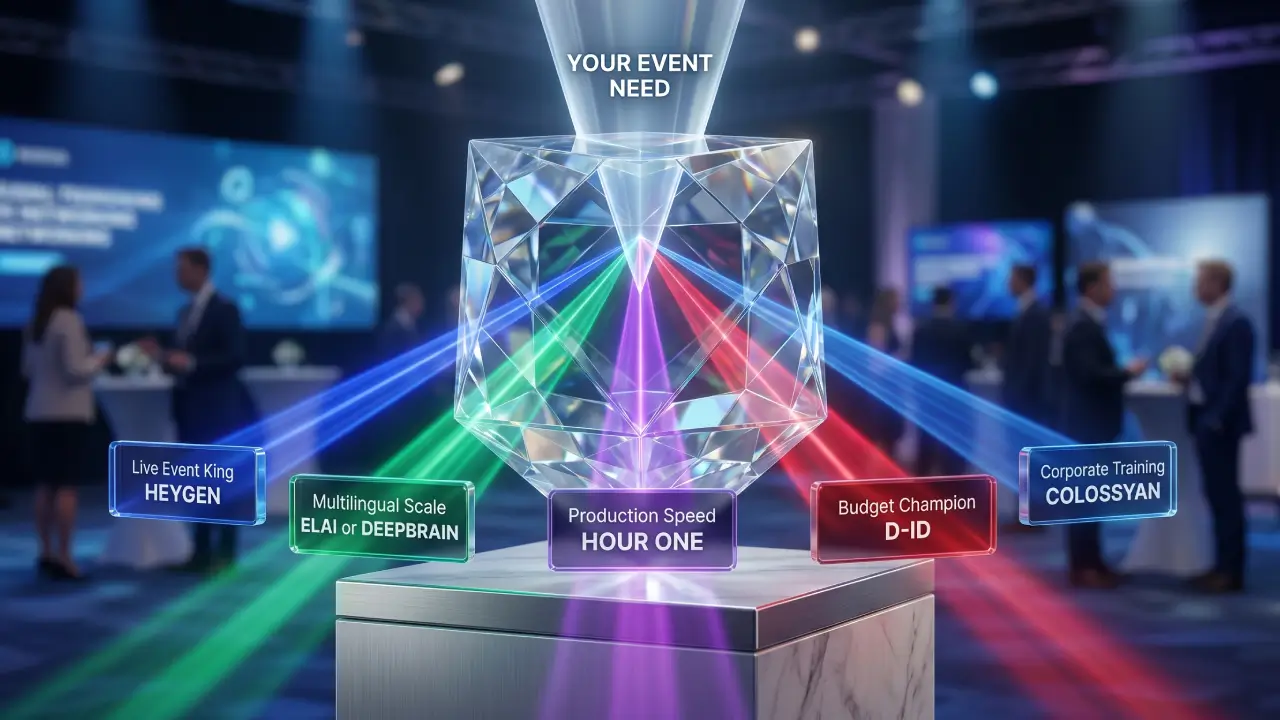
Pre-recorded and polished → HeyGen or Synthesia. Multilingual scale → Elai.io or DeepBrain. Speed → Hour One. Budget → D-ID.
Test latency on the free plan first. Write your script before picking your tool. And use the avatar alongside a human moderator, not instead of one. Engagement numbers are consistently better when you do.
Pick one. Test small. Scale what works.
Texora Verdict
Long-term user reports tell a consistent story: AI avatar tools work best when they replace a specific friction point, not an entire human. The tools that disappoint are the ones deployed as complete presenter replacements without testing latency, script quality, or audience fit first. Market consensus is clear that a sub-5-second response time isn’t optional; it is the baseline.
Miss it, and engagement drops fast, regardless of how polished the avatar looks. For most teams, Synthesia and HeyGen handle 80% of real-world use cases. D-ID wins on budget. Colossyan owns corporate training. The rest solve specific problems worth paying for only if that problem is actually yours. Buy for your current event need, not the feature list.
What is the best AI avatar software?
There is no single best; it depends entirely on what you are trying to fix. For polished pre-recorded content, Synthesia leads. For live events, HeyGen. For tight budgets, D-ID starts at $4.70 a month and holds its own against tools that cost six times more.
How can AI be used in events?
Most virtual events fail not because of bad content, but because of bad delivery, and that is exactly what AI fixes. AI handles real-time hosting, multilingual presentation, live Q&A moderation, audience engagement tracking, and automated follow-ups. Basically, everything that quietly falls apart when a human host is stretched too thin.
Which AI avatar is free?
Several tools here offer free plans worth actually using. D-ID, HeyGen, Zoice, and Akool all have free tiers with real functionality. Zoice gives 50 daily credits, Akool starts you with 100, and HeyGen lets you build your first avatar without a credit card.
What is the most realistic AI avatar generator?
Realistic enough that your audience stops noticing, that is the actual bar. DeepBrain AI comes closest, training directly on real human video to replicate lip sync, gestures, and head movement across 80+ languages. HeyGen runs a close second for live events.
How much does a digital avatar cost?
Less than you think, and that gap between expectation and reality is exactly why most people are still sleeping on these tools. D-ID starts at $4.70 a month, HeyGen at $29, and Synthesia scales for enterprise teams running hundreds of videos.
Free plans exist across most tools, so there is no reason to spend anything before you have seen results first.