


In This Article
You are putting in the hours. Your competitors are still growing faster; at some point, that stops being bad luck. A lot of them are just using free AI tools for digital marketing to handle the repetitive stuff: writing copy, SEO, graphics, and ads. Nothing exotic.
They started using these things; you did not, and the gap shows. This guide covers 9 free tools worth trying in 2026. No big team, no technical background, no budget required. Just a willingness to stop doing everything by hand.
Why Free AI Tools Actually Beat Paid Ones for Most Marketers in 2026
Paying for marketing tools and still not seeing results? You are not the only one. Here is the thing: in 2026, most free AI tools run on the same models as the paid ones. The difference is in usage limits, not quality. Generous free tiers now exist for writers, designers, and analytics tools. You can build a real marketing setup without a credit card.
Two rules before you start: First, always begin with the free plan and only upgrade if you genuinely hit a wall; most people never do. Second, pick one tool per job. One writer, one design tool, one analytics tool. Stacking free tools sounds smart; it mostly just creates chaos.
You can start making content, running research, and generating graphics today. No budget meeting, no approvals, no waiting.
The 9 tools below are where to start.
Tool #1: ChatGPT Free: Write Blog Posts, Ad Copy & Emails in Minutes

Three hours on a blog post that still feels off. Most writers know that feeling. ChatGPT’s free plan covers a lot: blog posts, social captions, email subject lines, and ad copy. One tool, no subscription. The free version also includes file uploads, basic web browsing, and GPT Store access, which most people do not bother exploring. If you want to understand how AI chatbots actually work before diving in, it helps you write sharper prompts from day one.
Three things that actually make a difference: Vague prompts get vague output. Tell it to your audience, your tone, and your goal in one sentence, and the results are night and day. Match the prompt to the platform. Short and punchy for social, more structured for blog outlines, personal for email. The one most people skip: write a short brand voice guide, your tone, your phrases, what you never say, and paste it at the top of every session. Your content stops sounding like everyone else’s.
One catch: the free plan has daily limits and shows ads in some regions. Do your important writing first.
Tool #2: Canva Magic Studio: Create Viral Designs Without Being a Designer
If your graphics look worse than your competitor’s, Canva’s Magic Studio is probably the fastest fix available, and you do not need to know anything about design. The free plan includes Dream Lab for image generation, Magic Write for copy, Magic Eraser, Background Remover, and auto-resizing across platforms. 190 million people use it. The free tier is genuinely useful, not just a teaser. If you are curious about how AI image generation works under the hood, it makes a real difference in how you write prompts for Dream Lab.
Three things worth doing from day one: Set up your Brand Kit first, logo, three colors, and two fonts. Every design Canva generates after that will match your brand automatically. Takes ten minutes once. Start with one design, then resize it into a social post, story, Facebook ad, email header, and thumbnail. One idea, six formats, a few minutes.
Be specific with Magic Design prompts. Instagram post for a digital marketing agency, modern and bold, gets you closer to publish-ready than a social media post ever will. One honest note: the free plan works. But if you are making visuals daily, the $15 Pro plan saves enough time that it stops feeling like an expense pretty quickly.
Tool #3: Google Search Console + GA4: The Free SEO Combo Nobody Uses Correctly
Months of content, barely any traffic growth. Before you blame the algorithm, check whether you are actually using the two free tools that explain everything. Google Search Console shows which keywords bring people to your site. GA4 shows what those people do once they arrive, which pages lose them, and which convert. Used separately, they are fine. Linked together inside GA4 settings, they show you exactly which search queries lead to actual conversions. No paid tool does this for free. Before you add anything else to your stack, it is worth knowing how to compare AI search optimization tools so you are not upgrading to something you do not actually need.
Three moves worth making this week: Export your top 20 keywords from GSC, paste them into ChatGPT, and ask it to cluster by intent and find content gaps. That’s a content strategy, no Ahrefs subscription needed. Find pages with high impressions but low click-through rates in GSC. Rewrite just the title and meta description. Traffic goes up without writing anything new.
One thing that trips beginners up: GSC might show 100 clicks while GA4 shows 80 sessions for the same period. That is normal. GSC records the click on Google’s end, and GA4 records when your page loads. Trust GSC for search data, GA4 for what happens after. Also worth knowing: GSC now tracks AI Overview appearances. Most marketers are not paying attention to that yet.
Tool #4: Copy.ai Free Plan: Generate Ad Headlines, Email Lines & Product Descriptions in Seconds
Staring at a blank screen for an hour over one ad headline is a specific kind of miserable. Copy.ai’s free plan is a reasonable fix.
You get 2,000 words a month and 90+ templates, ads, email hooks, product descriptions, video scripts, and social captions. No credit card required. What separates it from ChatGPT is that it runs GPT-4, Claude, and Gemini inside one interface, so you can switch models depending on what you’re writing.
Three things that actually matter: Tell it which framework to use. Write this using PAS, or use the AIDA formula, to get your copy that’s built to convert, not just copy that sounds fine. Never use the first result. Generate at least three variations; the third or fourth is almost always the one worth keeping. Use the Brand Voice feature even on the free plan. Feed it a few samples of your own writing, and it stops sounding generic. Takes five minutes to set up.
Honest caveat: 2,000 words a month disappear fast if you write copy regularly. The free plan works for occasional use, a few ad variations, and some subject lines. Daily use will hit the ceiling quickly.
Tool #5: Lumen5 Free: Turn Your Old Blog Posts Into Viral Videos in Under 10 Minutes
You spent hours on a blog post. It got 50 views. Someone else made a 10-minute video from similar content and got thousands. That gap is annoying, and Lumen5 is one way to close it. Paste a blog URL or some text, and it builds a video storyboard automatically, layouts, stock footage, and captions. No editing experience needed. It also exports in every format at once: landscape for YouTube and LinkedIn, square for Instagram and Facebook, vertical for Shorts and TikTok.
One video, every platform. Three things worth knowing: Start with your best-performing blog posts, not new ones. Check Search Console for what already gets impressions, then put a video behind content that is proven. End every video with a text overlay pointing back to your site. Video viewers don’t automatically become website visitors; you have to ask.
Spend two minutes reviewing the AI-selected visuals before exporting. It occasionally picks images that have nothing to do with your topic. A quick swap makes a noticeable difference. Honest note: the free plan gives you 5 videos a month at 480p with a watermark. Fine for social media testing. Client work or paid ads will need the $29 plan.
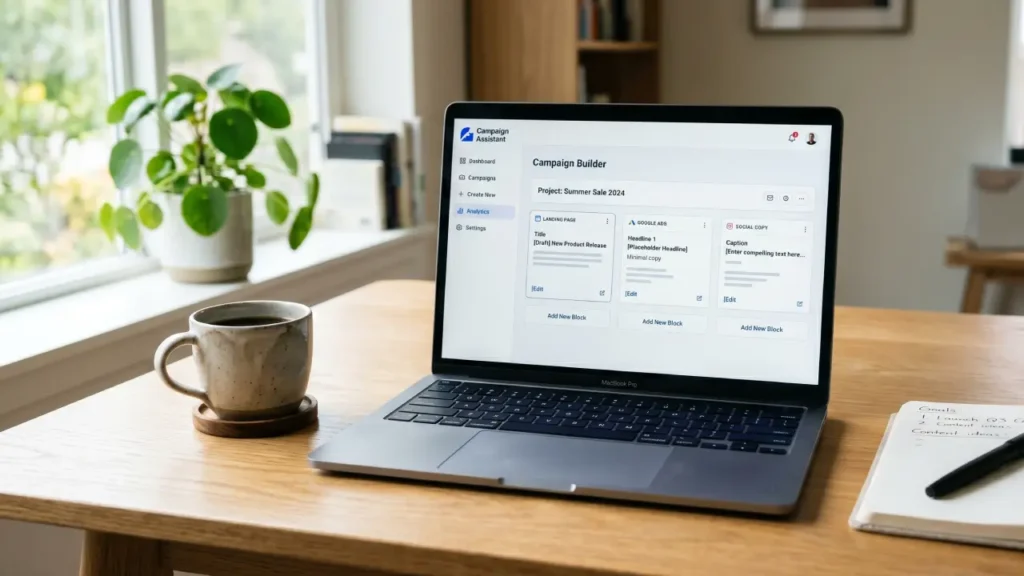
Tool #6: HubSpot Free Campaign Assistant: Build Landing Pages, Google Ads & Social Copy on Autopilot
Your blog post took hours. It got 50 views. Someone turned similar content into a video in 10 minutes and got thousands. That is not talent; that is a different tool. Lumen5 lets you paste a blog URL, and it builds a video storyboard automatically, with footage, captions, and layouts. It also exports every format at once: landscape for YouTube and LinkedIn, square for Instagram and Facebook, vertical for Shorts and TikTok. One input, every platform.
Three things that make a real difference: Do not start with new content. Open Search Console, find posts that already get impressions, and turn those into videos first. You are adding video to something with proven demand. End every video pointing back to your site. Video viewers don’t find your website on their own. A simple read of the full guide at [your site], text overlay does the job.
Check the AI-selected visuals before you export. It sometimes picks images that have nothing to do with your topic. Two minutes of swapping makes the whole thing look noticeably more professional. Free plan: 5 videos a month, 480p, Lumen5 watermark. Perfectly fine for social media. Client work or paid ads will need the $29 plan.
Tool #7: Gumloop Free: Automate Your Entire Marketing Workflow Without Writing a Single Line of Code
If you spend half your week copying data, writing reports, and sending follow-up emails, work that feels mechanical because it is, Gumloop is worth an hour of your time. It is a no-code automation platform. You drag nodes onto a canvas, connect them, and the chain runs on its own. One node scrapes a page, the next summarizes it with GPT-4 or Claude, and the next drops it into a Google Sheet. No code, no babysitting.
Three things worth trying first: Do not build from scratch. Use Gummie, the built-in chatbot, type what you want in plain English, and it builds the workflow for you. “Monitor my competitor’s blog and email me a summary every Monday” is enough to get started. The workflow most marketers are quietly using: pull competitors’ top social posts weekly, run them through an LLM for pattern analysis, save the best ideas to a Google Drive swipe file. Build it once, runs forever.
Browse the community template library before touching any settings. Find something close to your biggest time drain, copy it, and change the inputs. Done in minutes. Free plan: 500 credits a month, enough to test properly. Heavy daily automation, like bulk lead research, will need the $97 paid plan.
Tool #8: Microsoft Clarity Free: See Exactly Where Visitors Click, Scroll & Drop Off on Your Website
You built the website. People visit. They leave. You have no idea why. Google Analytics tells you 40% of visitors dropped off at checkout. Microsoft Clarity shows you what actually happened: someone rage-clicked a broken button seven times, or scrolled straight past your call-to-action without noticing it. That’s the difference between a number and an answer. It’s completely free, no traffic limits, no expiry.
Heatmaps, session recordings, and AI behavior summaries are tools that cost $39–$300 a month elsewhere. Three things to check first: Filter session recordings by Rage Clicks, repeated frantic clicking on the same spot. One fix on a checkout button can move conversions more than a full redesign. Check scroll depth on your highest-traffic pages. Most sites discover their biggest drop-off point this way, and it is usually fixable without touching the page structure.
Look for dead clicks, spots where visitors tap an image expecting something to happen, and nothing does. Make clickable things look clickable. Last move: connect Clarity with Google Analytics. GA gives you the numbers, Clarity shows you the behavior behind them. Together, they are more useful than either alone, and the combination costs nothing.
Tool #9: Google NotebookLM Free: Do Deep Market Research & Competitor Analysis in Minutes
Twenty browser tabs, hours of copy-pasting, and you still do not have a clear picture. That is not a research problem; that is a tooling problem. Google NotebookLM lets you upload up to 50 sources at once, PDFs, competitor sites, YouTube videos, Google Docs, industry reports, and ask questions across all of them together. What takes a weekend takes minutes.
The thing that separates it from ChatGPT: it only answers from what you upload, and it cites exactly where each insight came from. No hallucinations, no guessing. Three ways to actually use it: Upload 5 competitor articles and ask, “Where do these agree, where do they disagree, and what’s missing from all of them?” That gap is your content angle. Use the Deep Research prompt: “Compare products that compete with [yours] on features, pricing, and user sentiment.” It pulls from hundreds of pages and drops a sourced report straight into your notebook.
Try Audio Overview before dismissing it. It converts your research into a realistic podcast-style conversation between two AI hosts. Genuinely useful for absorbing dense material while doing something else. Free tier: 100 notebooks, 50 sources each, 50 daily queries, audio generation included. Paid research platforms charge hundreds for less.
Stop Waiting, Start Winning: Your First Step With Free AI Tools for Digital Marketing Starts Today
The tools in this guide are free. The only thing that actually costs you anything is waiting. 82% of small businesses are already running AI tools inside their daily workflows, according to SBE Council’s 2026 survey. That number is not meant to panic you; it is just context for how normal this has become. The productivity gains are real, but they do not come from testing every tool.
They come from picking one, using it for 30 days, and measuring something specific, such as hours saved, content published, or leads generated. Vanity metrics do not count. One trap worth naming: AI procrastination. Spending three hours comparing tools instead of using one is its own kind of avoidance. Pick the tool that solves your single biggest time drain right now. Use it. Add a second one later.
The gap between people who win with AI and people who do not is not about budget or technical skill. ChatGPT, Canva, Clarity, and NotebookLM all have free tiers that require zero setup knowledge, and if you get stuck, you can ask the tool itself. Nothing in this guide requires a perfect moment. Open one tool. Type one question. That is the whole first step.
If you are still unclear on the basics, start with what AI actually is and how it works. It takes 5 minutes and removes every excuse for not starting.
Texora Verdict
Long-term user reports confirm what marketing materials would not tell you: free AI tools fail most beginners not because of feature gaps, but because of scattered adoption. People install six tools, master none, and blame the technology. The friction is not the software; it is the habit. Community sentiment consistently shows that marketers who commit to one tool for 30 days before adding another outperform those running fragmented stacks by a significant margin.
Usage limits are real, but for most small business owners, they are not the actual ceiling. Consistency is. The value proposition here is legitimate. ChatGPT, Canva, Clarity, and NotebookLM collectively replace thousands of dollars in annual software spend, without meaningful quality trade-offs at beginner and intermediate usage levels. That is not hype. But none of it matters if you are still reading about tools instead of using them. Pick one. Start today. Everything else is noise.
Which AI tool is best for digital marketing?
There is no single best tool; it depends on your biggest problem right now. Stuck on content? Start with ChatGPT. Struggling with graphics? Start with Canva. Pick one, use it for 30 days, then add the next.
Which free AI is better than ChatGPT?
Honestly, it depends on the job. Google NotebookLM beats ChatGPT for research because it never makes up facts. Copy.ai beats it for ad copy because it uses structured frameworks. The smartest move is to stop looking for one winner and start matching the right tool to the right task.
Which AI is completely free?
Several powerful AI tools are genuinely free, no credit card, no expiry date. ChatGPT, Google NotebookLM, Microsoft Clarity, and Canva Magic Studio all have free tiers that stay free forever. The catch is usage limits, not quality, and for most beginners, those limits are more than enough to get real results.
What is the 3 3 3 rule in marketing?
The 3-3-3 rule is simple: 3 seconds to grab attention, 3 sentences to hold it, 3 words to make it stick. People do not read; they scan and decide instantly. Write every headline and ad with that clock running, and your content will convert better without changing anything else.
Free AI marketing tools for small businesses
Small businesses have an unfair advantage right now; the same AI big brands pay for is available for free. ChatGPT writes your content, Canva handles design, Clarity shows why visitors leave, and NotebookLM replaces expensive research tools. A complete marketing stack, zero budget required.