


In This Article
Web users rarely think about the machinery operating behind a website. A page appears in seconds. Images load. Forms submit. Videos stream. The experience feels immediate. It is not.
Every website depends on a chain of systems working together under strict technical rules. A browser cannot display a page until it identifies the correct destination. A server cannot deliver content until it receives a valid request. Data cannot reach a device until networks route it across the internet.
Understanding how websites work removes much of the mystery surrounding the modern web. It explains why some pages load instantly while others stall. It clarifies why security warnings appear. It reveals how information travels from a server thousands of miles away to a screen in a fraction of a second.
The process is remarkably precise.
Understanding How Websites Work at the Foundation Level
To understand how websites work, it helps to begin with the website itself.
A website is not a single file. It is a collection of interconnected resources stored on a web server. These resources include documents, images, style sheets, databases, and application logic that work together to create a user experience.
When someone visits a website, they are not opening a file directly from their computer. They are requesting information from a remote system connected to the internet.
Everything begins there.
The web operates through a request-and-response model. A user requests a resource. A server responds with the required data. The browser then interprets that data and renders a visual page.
Simple in theory.
Complex in execution.
Why Domain Names Exist
A critical part of understanding how websites work involves understanding domain names.
Every device connected to the internet has an IP address. This address acts as a numerical identifier that allows devices to locate one another across networks.
Humans are terrible at remembering long strings of numbers.
Domain names solve that problem.
Instead of entering a numerical address, users type a memorable website name into a browser. The domain becomes a human-friendly layer that sits on top of the internet’s addressing system.
Without domain names, internet navigation would be impractical for most users.
The convenience appears simple. The underlying process is not.
The Hidden Lookup Process Behind Every Website Visit
The moment a user enters a web address, a lookup process begins.
This stage is one of the most important parts of how websites work.
The browser cannot contact a server until it discovers the server’s IP address. The Domain Name System (DNS) serves as the internet’s naming infrastructure, translating human-readable domain names into machine-readable IP addresses. To find that address, it queries the Domain Name System, commonly known as DNS. Web Process Primary Function Typical Execution Time Failure Impact DNS Lookup Resolves domain to IP address 20–200 ms Website inaccessible TLS Handshake Establishes encrypted connection 50–300 ms Security warning or blocked access Server Processing Generates requested content 50–1000+ ms Slow page response Data Packet Routing Delivers information across networks Milliseconds Packet loss or delays Browser Rendering Converts code into visible content 100–1500 ms Layout or performance issues CDN Delivery Serves cached assets near users 10–100 ms Increased latency
DNS functions like a global directory service.
When a browser requests a domain, DNS records return the correct IP address associated with that website. Only after this translation occurs can communication begin.
The entire exchange usually finishes in milliseconds.
Users rarely notice it.
Yet every website visit depends on it.
A DNS failure instantly breaks access regardless of how powerful the website server may be.
How Browsers Establish Connections
After obtaining the server address, the browser attempts to establish a connection.
The browser itself relies on the operating system to manage network connections, memory allocation, and communication with hardware. Readers interested in the software layer beneath browsers can explore our guide on How Operating Systems Work: A Basic Guide for New Tech Users.
This stage determines whether the website can begin transferring information.
Modern websites typically rely on secure communication protocols that encrypt traffic between users and servers. Before content transmission begins, both sides perform a verification process that confirms authenticity and negotiates encryption standards.
The browser verifies.
The server responds.
Trust is established.
Only then does data start moving.
This verification sequence is one reason secure websites display a padlock icon in the address bar.
The symbol represents successful encrypted communication rather than website quality or legitimacy.
How Websites Work Through Web Servers
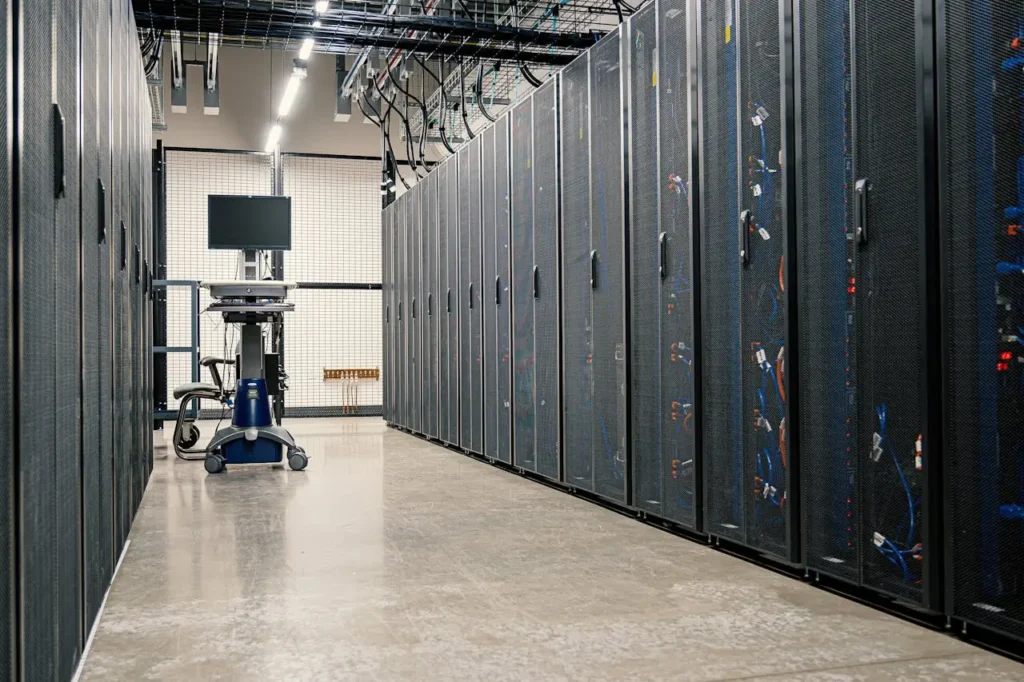
Web servers sit at the center of how websites work.
A web server stores website assets and responds to incoming requests. Whenever a visitor opens a page, the server identifies the required resources and begins delivering them.
For a simple page, this may involve sending an HTML document along with associated images.
For a dynamic application, the process becomes more demanding.
The server may retrieve information from databases. It may validate user credentials. It may generate customized content before sending a response.
The visitor sees a page.
The server may have executed dozens of operations.
This distinction explains why server performance directly influences website speed.
Slow servers create slow websites.
No design optimization can fully compensate for inefficient backend infrastructure.
How Data Travels Across the Internet
Many beginners imagine website information moving as one continuous stream.
That is not how websites work.
Internet data is divided into packets before transmission begins.
Each packet contains a small portion of the requested information. Routers positioned throughout global networks analyze these packets and determine the most efficient route toward their destination.
Different packets may travel through entirely different network paths.
They often do.
The browser eventually receives all packets and reassembles them into their original form.
This approach increases efficiency and resilience.
If one network route experiences congestion, packets can often travel through alternative paths without disrupting communication entirely.
The internet survives because of this flexibility.
How Browsers Transform Code into Visual Pages
A browser does far more than display information.
Understanding how websites work requires understanding browser rendering.
When files arrive from a server, browsers begin interpreting their contents.
HTML provides structural information.
CSS controls presentation.
JavaScript introduces dynamic behavior.
The browser parses each resource. It constructs an internal representation of the page. It calculates layouts. It applies styling rules. It executes scripts. Finally, it renders visual elements on the screen.
The user sees text.
The browser has processed thousands of instructions.
Modern rendering engines perform these operations at extraordinary speed, yet inefficient code can still create noticeable delays.
Performance issues frequently originate here.
Not at the server.
The Relationship Between Front-End and Back-End Systems
Many discussions about how websites work separate websites into two environments.
The front end represents everything visible to users.
The back end represents everything operating behind the scenes.
The front end handles presentation. The back end manages processing logic, databases, authentication systems, and business rules.
Neither can function effectively without the other.
An attractive interface becomes useless if backend requests fail.
A powerful backend becomes invisible if the front-end experience is poorly designed.
The most successful websites maintain balance between both environments.
Technical excellence demands it.
What Happens When a User Clicks a Link
Link navigation demonstrates how websites work in real time.
When a user selects a link, the browser identifies the target destination and begins a new request sequence.
DNS lookup may occur again.
A connection may be re-established.
Additional resources may be requested.
The server generates another response.
The browser renders another page.
This cycle repeats continuously during web browsing.
The process feels instantaneous because modern systems execute each stage with remarkable efficiency.
Behind every click lies an intricate chain of events.
Most users never see it.
Website Security and Encrypted Communication
Security is inseparable from how websites work.
Without encryption, sensitive information would travel across networks in readable form. Attackers positioned between users and servers could intercept credentials, payment details, or personal information.
Encryption eliminates this exposure by converting readable data into encoded information during transmission.
Raw data disappears from view.
Interception becomes significantly less useful.
Security does not end with encryption, however.
Servers enforce authentication controls. Applications validate requests. Firewalls filter malicious traffic. Monitoring systems detect abnormal behavior.
Weakness at any layer creates risk.
Strong websites treat security as an operational discipline rather than a feature.
Why Websites Remain Available Around the Clock
Continuous availability requires extensive infrastructure planning.
Understanding how websites work includes understanding redundancy.
Modern websites rarely depend on a single server. Traffic is often distributed across multiple systems. Backup resources remain available if primary systems fail. Content delivery networks position cached resources closer to users, reducing latency and minimizing infrastructure strain.
Reliability emerges through redundancy.
Not luck.
When visitors access major platforms during peak traffic periods, countless systems operate simultaneously to prevent interruptions.
Availability is engineered.
Why Understanding How Websites Work Matters
Learning how websites work provides practical benefits beyond technical curiosity.
Users gain a clearer understanding of loading delays. They recognize why DNS failures prevent access. They better understand security warnings and encrypted connections.
Business owners benefit even more.
Website decisions become easier when the underlying mechanisms are understood. Performance discussions become meaningful. Hosting choices become informed. Security investments become easier to justify.
The internet often appears effortless.
It is anything but.
Every webpage depends on coordinated interactions between browsers, servers, networks, protocols, and security systems. Remove any one of them and the experience collapses.
That reality explains why understanding how websites work remains one of the most valuable foundations in digital technology.
What is the first step when opening a website?
DNS lookup. The browser must translate the domain name into an IP address before communication with the website server can begin.
How do domain names work?
They act as human-readable addresses. Domain names allow users to access websites without remembering numerical IP addresses.
What does a web server actually do?
It stores and delivers website resources. A server processes requests and returns files, data, or application responses to visitors.
Why do websites sometimes load slowly?
Server delays, network congestion, or rendering bottlenecks are common causes. Performance issues can occur at multiple stages of the delivery process.
Is HTTPS the same as website security?
No. HTTPS encrypts data in transit, but overall security also depends on authentication, server configuration, and application protection.
What is DNS in simple terms?
DNS is the internet’s directory service. It converts domain names into IP addresses that computers use for communication.
Why is browser caching important?
It reduces repeated downloads. Cached resources allow browsers to load previously accessed content faster.
Can a website work without a server?
No. Website files must be hosted on a server or hosting environment that can respond to internet requests.